Radiate 数据集融合前置:图像和激光雷达的校正,配准,融合
前言
这个数据集在雾天的信息其实很不适合训练网络(静止,长时间的静态,画面统一,可分类物件少)。不过可以测试一下非学习的方法性能效果具体如何。顺便学习一下怎么预处理点云和图像数据。
该数据集的工具包:Github 跳转
工具包内是包含了大量的处理函数(后来才发现),但依然有一些纰漏。重新记录一下。
摄像机与激光雷达的世界坐标校正
坐标转换
首先是坐标转换的公式:
通过 R(旋转矩阵)和 T(平移向量),可以通过以下公式实现坐标转换:
其中, 是传感器坐标系下的点, 是转换到世界坐标系后的点。
但是要注意的是,这个数据集里的 R 矩阵是 1x3 的格式。换言之不是传统的旋转矩阵而是欧拉角。需要做进一步的运算。
def RX(self, LidarToCamR):
        thetaX = np.deg2rad(LidarToCamR[0])
        Rx = np.array([[1, 0, 0],
                       [0, np.cos(thetaX), -np.sin(thetaX)],
                       [0, np.sin(thetaX), np.cos(thetaX)]]).astype(np.float32)
        return Rx

    def RY(self, LidarToCamR):
        thetaY = np.deg2rad(LidarToCamR[1])
        Ry = np.array([[np.cos(thetaY), 0, np.sin(thetaY)],
                       [0, 1, 0],
                       [-np.sin(thetaY), 0, np.cos(thetaY)]])
        return Ry

    def RZ(self, LidarToCamR):
        thetaZ = np.deg2rad(LidarToCamR[2])
        Rz = np.array([[np.cos(thetaZ), -np.sin(thetaZ), 0],
                       [np.sin(thetaZ), np.cos(thetaZ), 0],
                       [0, 0, 1]]).astype(np.float32)
        return Rz

    def transform(self, LidarToCamR, LidarToCamT):
        Rx = self.RX(LidarToCamR)
        Ry = self.RY(LidarToCamR)
        Rz = self.RZ(LidarToCamR)

        R = np.array([[1, 0, 0],
                      [0, 0, 1],
                      [0, -1, 0]]).astype(np.float32)
        R = np.matmul(R, np.matmul(Rx, np.matmul(Ry, Rz)))
return Rps:欧拉角的运算尤其要注意顺序
如何把某一个传感器的数据导入到另一个坐标系
坐标转换: 根据雷达或激光雷达的校准参数,将它们的点云数据转换到相机坐标系或世界坐标系。此外为了方便运算可以直接使用变换矩阵 T (4*4)。当然如果想一部到位的话,也可以直接构建两个坐标系下的坐标转换的旋转矩阵。
这里举把激光雷达投影到图像坐标系的例子。
将摄像头坐标系下的点投影到图像平面: 使用上面的投影函数,将三维点投影到二维图像坐标系,获取相机图像中的像素位置。
将所有传感器的坐标转换到同一世界坐标系: 使用相机、激光雷达和雷达之间的转换矩阵和偏移量(例如立体校准参数、相机与雷达之间的转换)来将所有数据映射到世界坐标系中。
这样,就可以在同一个坐标系中进行数据融合,从而实现更精确的传感器数据集成。
此事在官方的转换文件当中亦有记载:
self.LidarToLeftT = self.LidarT - self.LeftT
self.LidarToRightT = self.LidarT - self.RightT

self.LidarToLeftR = self.LidarR - self.LeftR
self.LidarToRightR = self.LidarR - self.RightR投影到像素坐标系下
相机内参的意义
数据集的相机参数中,包括 焦距(fx, fy) 和 主点(cx, cy) 等参数,这些是典型的相机内参,用于描述相机的投影特性。以下是每个参数的含义:
焦距(fx, fy):焦距是相机镜头的关键特性,它决定了相机对景物的放大程度。
fx是相机在水平轴上的焦距,fy是在垂直轴上的焦距。它们通常与相机的像素大小相关,并通过内参矩阵进行表示。主点(cx, cy):主点是图像坐标系中的光轴与图像平面交点的位置。通常,主点位于图像的中心,表示相机成像的参考点。
cx是水平坐标,cy是垂直坐标。通常,主点的坐标应该接近图像的中心,但它可以偏移。畸变系数(k1, k2, k3, p1, p2):这些参数用于描述相机镜头的畸变,主要有径向畸变(k1, k2, k3)和切向畸变(p1, p2)。它们的作用是纠正镜头引起的几何变形,特别是在广角镜头中。
分辨率(res):相机的分辨率表示图像的宽度和高度,即图像的像素数量。
投影
在多传感器融合中,通常需要将不同传感器(例如摄像头、激光雷达、雷达等)的数据转换到同一个坐标系。可以使用相机的内参来将三维世界坐标点投影到二维图像坐标系,并将它们映射到相同的世界坐标系中。
投影过程可以通过相机内参矩阵进行,以下是具体步骤:
- 相机坐标系到像素坐标系的转换:
其中 和 是图像坐标系中的像素坐标, 是三维空间中的点。
- 畸变校正: 对投影结果进行畸变校正。
具体公式懒得写了,以前搞cv都常考的畸变公式。但是opencv一行代码封装的事情:
def camera_2d_calibration(img, cam_mat, k1, k2, p1, p2):
    """
    对相机图像进行二维校正。

    :type img: np.array
    :param img: 相机图像

    :type cam_mat: np.array
    :param cam_mat: 相机内参矩阵

    :type k1: float
    :param k1: 相机畸变参数k1

    :type k2: float
    :param k2: 相机畸变参数k2

    :type p1: float
    :param p1: 相机畸变参数p1

    :type p2: float
    :param p2: 相机畸变参数p2

    :rtype: np.array
    :return: 返回校正之后的相机图像
    """
    h, w = img.shape[:2]
    map1, map2 = cv2.initUndistortRectifyMap(cam_mat, np.array([k1, k2, p1, p2, 0]), None, None, (w,h), cv2.CV_32FC1)
    dst = cv2.remap(img, map1, map2, cv2.INTER_LINEAR)
return dst不过畸变要注意的是,图像本身是有镜头的畸变的,而投影(小孔成像)的方法得到的变换后的点云投影是标准的成像投影。
换言之,要给raw图像做畸变的矫正,而激光雷达的点云数据投影之后基本上不用这一步的处理(?或者反处理?后续再调研研究。
最后就是投影的效果:这边用颜色渐变来反应深度信息
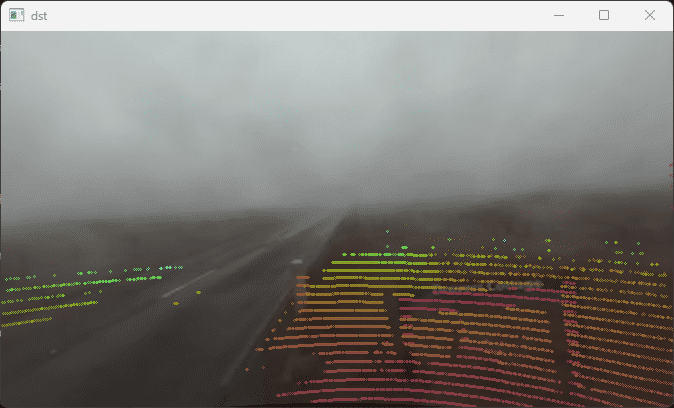
测试代码(需要包括工具包的calibration,raidiate两个文件)
import numpy as np
import matplotlib.pyplot as plt
import yaml,csv
import cv2
import calibration as calb
import radiate as rad


def project_lidar2img(img, lidar, lidar_extrinsics, cam_intrinsic, color_mode='same'):
    """
    Method to project the lidar into the camera

    :type img: np.array
    :param img: image with shape HxWx3

    :type lidar: np.array
    :param lidar: lidar point cloud with shape Nx5 (x,y,z,intensity,ring)

    :type lidar_extrinsics: np.array
    :param lidar_extrinsics: 4x4 matrix with lidar extrinsic parameters (Rotation
        and translations)

    :type cam_intrinsic: np.array
    :param cam_intrinsic: 3x3 matrix with camera intrinsic parameters in the form
        [[fx 0 cx],
        [0 fx cy],
        [0 0 1]]

    :type color_mode: string
    :param color_mode: what type of information is going to be representend in the lidar image
    options: 'same' always constant color. 'pseudo_distance': uses a color map to create a psedo
    color which refers to the distance. 'distance' creates an image with the actual distance as float

    :rtype: np.array
    :return: returns the projected lidar into the respective camera with the same size as the camera
    """
    fx = cam_intrinsic[0, 0]
    fy = cam_intrinsic[1, 1]
    cx = cam_intrinsic[0, 2]
    cy = cam_intrinsic[1, 2]

    im_lidar = np.zeros_like(img)
    lidar_points = lidar[:, :3].T
    R = lidar_extrinsics[:3, :3]
    lidar_points = np.matmul(R, lidar_points).T
    lidar_points += lidar_extrinsics[:3, 3]
    for i in range(lidar.shape[0]):
        if (lidar_points[i, 2] > 0 and lidar_points[i, 2] < 80):
            xx = int(((lidar_points[i, 0] * fx) / lidar_points[i, 2]) + cx)
            yy = int(((lidar_points[i, 1] * fy) / lidar_points[i, 2]) + cy)
            if (xx > 0 and xx < img.shape[1] and yy > 0 and yy < img.shape[0]):
                if color_mode == 'same':
                    im_lidar = cv2.circle(
                        im_lidar, (xx, yy), 1, color=(0, 255, 0))
                elif color_mode == 'pseudo_distance':
                    dist = np.sqrt(lidar_points[i, 0] * lidar_points[i, 0] +
                                   lidar_points[i, 1] * lidar_points[i, 1] +
                                   lidar_points[i, 2] * lidar_points[i, 2])
                    norm_dist = np.array(
                        [(dist / 20) * 255]).astype(np.uint8)
                    cc = np.array(plt.get_cmap('viridis')(norm_dist)) * 255
                    im_lidar = cv2.circle(
                        im_lidar, (xx, yy), 1, color=cc[0][:3])
                elif color_mode == 'distance':
                    dist = np.sqrt(lidar_points[i, 0] * lidar_points[i, 0] +
                                   lidar_points[i, 1] * lidar_points[i, 1] +
                                   lidar_points[i, 2] * lidar_points[i, 2])
                    im_lidar[yy, xx] = dist

    return im_lidar


def camera_2d_calibration(img, cam_mat, k1, k2, p1, p2):
    """
    对相机图像进行二维校正。

    :type img: np.array
    :param img: 相机图像

    :type cam_mat: np.array
    :param cam_mat: 相机内参矩阵

    :type k1: float
    :param k1: 相机畸变参数k1

    :type k2: float
    :param k2: 相机畸变参数k2

    :type p1: float
    :param p1: 相机畸变参数p1

    :type p2: float
    :param p2: 相机畸变参数p2

    :rtype: np.array
    :return: 返回校正之后的相机图像
    """
    h, w = img.shape[:2]
    map1, map2 = cv2.initUndistortRectifyMap(cam_mat, np.array([k1, k2, p1, p2, 0]), None, None, (w,h), cv2.CV_32FC1)
    dst = cv2.remap(img, map1, map2, cv2.INTER_LINEAR)
    return dst


def merge_images(background, overlay):
    """
    合并两个图像,一个作为背景,另一个图像黑色部分去除,其余部分覆盖到背景图上。

    :type background: np.array
    :param background: 背景图像

    :type overlay: np.array
    :param overlay: 要覆盖到背景上的图像

    :rtype: np.array
    :return: 返回合并后的图像
    """
    # 创建一个与背景图像相同的图像
    merged_image = background.copy()

    # 找到覆盖图像中非黑色的部分
    overlay_indices = np.where(overlay != 0)

    # 将覆盖图像的非黑色部分覆盖到背景图像上
    merged_image[overlay_indices] = overlay[overlay_indices]

    return merged_image


def project_to_camera_image(point_cloud, T, K):
    point_cloud_1 = np.hstack((point_cloud, np.ones((point_cloud.shape[0],1))))
    point_cloud_1 = np.dot(T, point_cloud_1.T).T
    point_xyz = point_cloud_1[:, :3]
    point_distance = np.linalg.norm(point_xyz, axis=1)

    # 将3D点云投影到相机图像上
    point_xyz = np.dot(K, point_xyz.T).T
    point_xyz = point_xyz / point_xyz[:, 2].reshape(-1, 1)

    return np.column_stack((point_xyz[:,:2].reshape(-1, 2), point_distance))


# 读取CSV文件中的点云数据
def read_point_cloud_from_csv(file_path):
    """
    读取CSV文件中的点云数据。

    参数:
        file_path (str): CSV文件的路径。

    返回:
        tuple: 包含坐标和强度数据的元组 (xyz, intensity)。
    """
    xyz = []
    intensity = []
    channel = []

    with open(file_path, 'r') as file:
        reader = csv.reader(file)
        for row in reader:
            if len(row) >= 5:
                x, y, z = float(row[0]), float(row[1]), float(row[2])
                i = float(row[3])
                c = int(row[4])
                xyz.append([x, y, z])
                intensity.append(i)
                channel.append(c)

    return np.array(xyz), np.array(intensity), np.array(channel)


# 示例用法
if __name__ == "__main__":
    file_path = 'D:\development\SLAM\Dehaze\pythonProject\data\default-calib.yaml'
    data_path = 'E:\BaiduNetdiskDownload/radiate/fog_8_0/velo_lidar/001784.csv'
    img_path = 'E:\BaiduNetdiskDownload/radiate/fog_8_0/zed_left/001784.png'

    lidar_points, intensity, channel = read_point_cloud_from_csv(data_path)


    # 相机内参
    with open(file_path, 'r') as file:
        calib_data = yaml.safe_load(file)
    repost = calb.Calibration(calib_data)

    radi = rad.Sequence('E:\BaiduNetdiskDownload/radiate/fog_8_0', 'D:\development\SLAM\Dehaze\pythonProject\data\config.yaml')

    # dst = radi.project_lidar(np.column_stack([lidar_points, intensity, channel]), repost.LidarToLeft, repost.left_cam_mat, color_mode='same')
    fst = cv2.imread(img_path)
    dst = project_lidar2img(fst, np.column_stack([lidar_points, intensity, channel]), repost.LidarToLeft, repost.left_cam_mat, color_mode='pseudo_distance')
    cv2.imshow('dst', dst)
    cv2.waitKey(0)
    fst = camera_2d_calibration(fst, repost.left_cam_mat, repost.left_cam_dist[0], repost.left_cam_dist[1], repost.left_cam_dist[2], repost.left_cam_dist[3])

    cv2.imshow('fst', fst)
    cv2.waitKey(0)

    dst = merge_images(fst,dst)

    # 转换点云
    # world_points = project_to_camera_image(lidar_points, repost.LidarToLeft, repost.left_cam_mat)

    # dst = extract_colors_from_image(world_points, cv2.imread('E:/BaiduNetdiskDownload/radiate/fog_8_0/zed_left/001784.png'))

    cv2.imshow('dst', dst)
cv2.waitKey(0)利用深度信息去噪
利用一些光的散射公式可以解决雨雾的一些去噪问题。
滤波
主要思想是导向滤波:这边有一个很好的参考博客码上:
详解——导向滤波(Guided Filter)和快速导向滤波
不过要额外拆解的是,点云的投影是离散的数据。
去雾实践
深度信息的融合
这边主要还是考虑3D点的信息为主。首先要解决的第一步是图像生成点的问题。